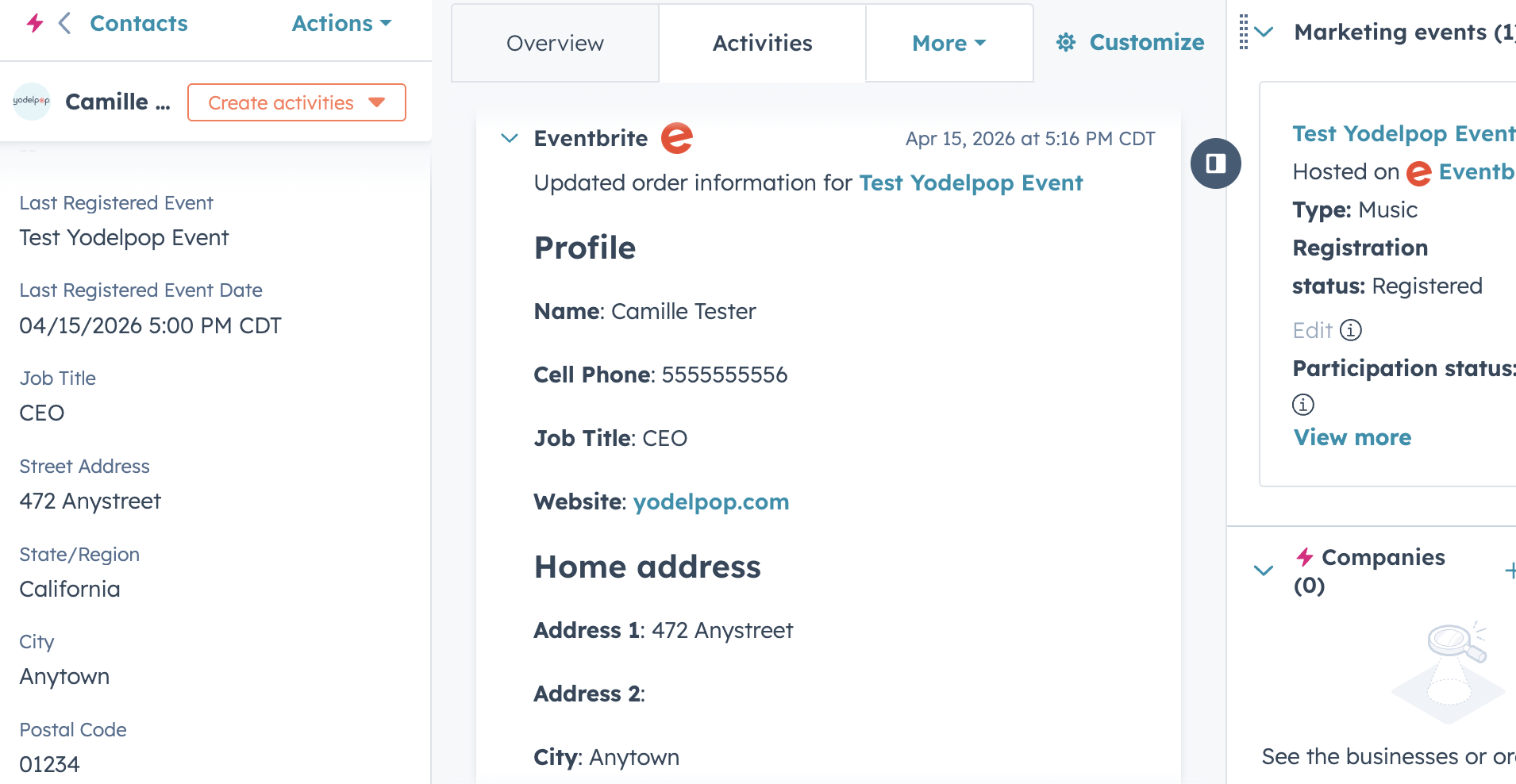
 Does Eventbrite integrate with HubSpot? Yes—but only partially out of the box. There is a native HubSpot Eventbrite integration available in the HubSpot App Marketplace. It allows you to sync event registrations, track attendance, and associate contacts with events inside your CRM.
But once you start using it for real marketing and follow-up, you’ll likely run into a key issue: Some data syncs… but your custom fields don’t. If you’re relying on event data to segment your audience, personalize outreach, or drive growth, that gap matters.
Let’s walk through how the integration actually works—and how to fix what’s missing.
How the HubSpot Eventbrite Integration Works
When you connect Eventbrite to HubSpot, the native integration will:
- Create contacts from Eventbrite registrants
- Sync events into HubSpot Marketing Events
- Track registrations, attendance, and cancellations
- Associate event activity with contact records
This gives you a clear view of how contacts are engaging with your events—directly inside HubSpot.
For many teams, this is enough to get started.
What Data Syncs Between Eventbrite and HubSpot
The integration works reliably with standard Eventbrite fields, including:
- First Name
- Last Name
- Company
- Job Title
These fields:
- Map directly to HubSpot contact properties
- Populate automatically
- Can be used in lists, filters, and workflows
This is why the integration often appears to be working perfectly at first.
HubSpot Eventbrite Integration Limitations
Here’s where things break down.
Custom Eventbrite fields do not sync through the native HubSpot integration.
If you add custom questions to your Eventbrite registration form—such as:
- “What best describes your role?”
- “What are you hoping to learn?”
- “Organization size”
That data will stay in Eventbrite.
It will not automatically appear:
- On the contact record
- In HubSpot properties
- In segmentation or reporting
Why Custom Fields Don’t Sync
This comes down to how Eventbrite structures its data.
- Standard fields = structured and predictable
- Custom questions = flexible, unstructured responses
The native integration only maps structured fields.
So while it handles registrations and attendance well…It doesn’t capture the deeper context you’re collecting.
Watch the Full Tutorial
Want to see exactly how this works?
In this walkthrough, I cover:
- The full HubSpot Eventbrite integration setup
- What syncs (and what doesn’t)
- How to fix custom fields step-by-step
Why This Matters (Especially for Nonprofits)
If you’re using events as part of your growth strategy, this limitation creates real gaps.
Without custom data, you lose the ability to:
- Segment your audience
- Personalize follow-up
- Qualify donors, members, or leads
- Understand intent and engagement
For nonprofits and mission-driven organizations, events are often:
- Entry points for new supporters
- Education channels
- Fundraising drivers
If that data isn’t captured correctly, you’re limiting your ability to build relationships and scale your impact.
This is a common issue we address when building structured systems like our
Nonprofit CRM Growth Roadmap
How to Fix It: Map Custom Fields with Zapier
To fully connect Eventbrite and HubSpot, you need an additional layer.
The simplest solution is Zapier.
How it works:
- Trigger: New Eventbrite registration
- Action: Create or update contact in HubSpot
- Map: Custom Eventbrite fields → HubSpot properties
This allows you to:
- Capture custom responses
- Store them in HubSpot
- Use them in segmentation, automation, and reporting
Setup is straightforward and typically takes about 10–15 minutes.
Should You Still Use the Native Integration?
Yes.
The native integration is still essential because it:
- Creates Marketing Event records
- Tracks event engagement (registrations, attendance)
- Provides event-level reporting inside HubSpot
Zapier simply fills the gap by ensuring your contact data is complete.
How This Fits Into a Scalable CRM Strategy
Most teams connect tools—but don’t think about how the data flows.
A strong CRM system should:
- Capture meaningful data
- Organize it into usable properties
- Trigger follow-up based on behavior
When your HubSpot Eventbrite integration is fully set up, you can:
- Segment contacts based on event engagement
- Automate follow-up sequences
- Track how events contribute to growth and revenue
This is where the real value comes from—not just syncing tools, but building a system.
So—does Eventbrite integrate with HubSpot?
Yes, but only partially out of the box.
- Standard fields sync automatically
- Custom fields do not sync through the native integration
To make it fully functional:
- Use Zapier (or a similar tool) to map custom fields
If you want to strengthen your overall system beyond this integration, start here.